Release 51.1 Notes 05 May 2026#
Summary#
In this release, we’ve developed the following improvements:
In the Labor Hub screen, actions are now available in a new Table Actions drawer at the bottom of each tab. This drawer is collapsible and designed to stay accessible without blocking the view of your workspace.
In Widget Builder’s Design Chart, the Real Time field is now called Refresh Rate. It is now also checked by default and has a default value of 60 minutes.
Improvements#
Actions Menu leaves Labor Menu screen Readily Visible#
In the Labor Hub screen, actions are now available in a new Table Actions drawer at the bottom of each tab. This drawer is collapsible and designed to stay accessible without blocking the view of your workspace.

Previously, you could access actions in a floating toolbar that could cover up your data and the page’s scrollbar. To access this new action drawer, you can either:
Hover over the drawer to temporarily expand it and access actions
Pin the drawer open using the arrow to keep all tools visible
When you make selections within a tab, the drawer header updates to reflect them. For example, if you select multiple errors in the Activity Audit screen, it displays the number of selected errors in the header.
Widget Builder Refresh Rate Default set to 60 min#
In Widget Builder’s Design Chart, the Real Time field is now called Refresh Rate. It is now also checked by default and has a default value of 60 minutes.
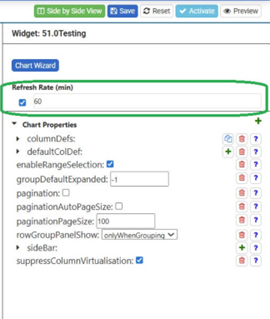
Previously, the refresh settings were displayed in seconds and defaulted to 300 seconds, which made the configuration less intuitive and required you to convert to minutes.
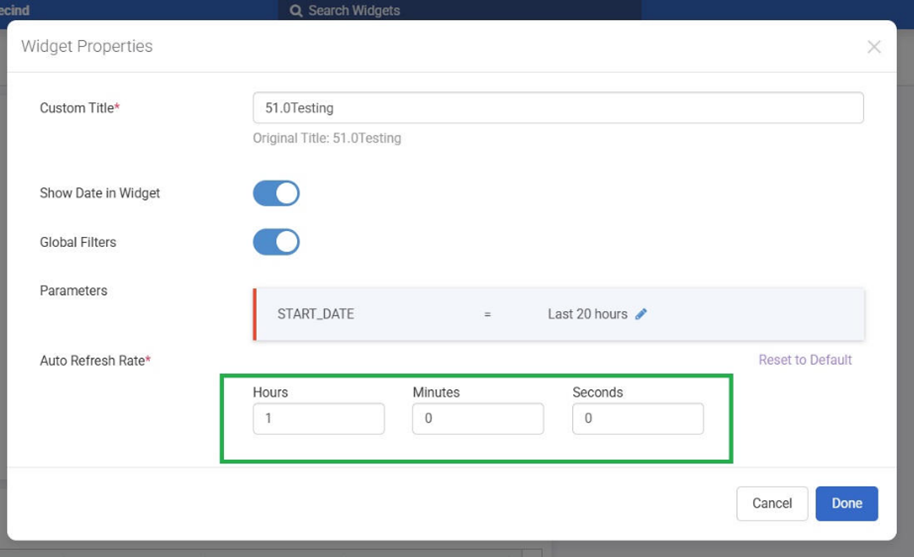
Widgets that already have a custom refresh rate keep their custom refresh rate, but it now displays in minutes instead of seconds. The field name change now also matches the Refresh Rate field in the Widget Properties window on dashboards.
Bug Fixes#
Widget name change does not persist throughout system.
Labor Hub - Associate ID is not displayed in delete confirmation warning or success toast in Associates tab
Widget Builder - Filter stage giving error - The function PARAM requires at least 2 parameters : fieldName = PARAM(paramName,COMPARISON VALUE)